Language Option
To select the required language press PROG and enter the code 2305 and press Enter. Then select the required language from the selection.
Standard Terms
Self Learning Optimisation is a system whereby the Heatmiser Control will automatically calculate the start up time to ensure the building is up to temperature for the programmed switching time. It does this by monitoring the internal temperature readings, so that for example, in milder weather conditions heat up times are reduced - thus saving energy.
Preheat is the number of hours the control can come on before the programmed switching time (when in optimising mode) This is setup under the Engineers code and can be set to no more than 8 hours.
Rate of Change is the time it takes to raise the building by 1.0°C. The factory default for this setting is 20 minutes but the control will automatically adjust this according to the fabric of the building.
Override Using the override button on the Heatmiser keypad allows the user to override the zone for a selected number of hours, to allow for unscheduled use of the system. A maximum can be set to stop users entering long override periods.
Switching period status:
- Day is when the control is being controlled to an actual switching time (For example between 07.00 - 17.00 the control would be in a DAY condition) Outside of these hours the control would be in a night condition.
- Night is when no switching times have been programmed. At these times the control is set back to the night temperature.
Heater Lockout and Reset is standard on the Heatmiser Mistral and allows for a signal to be fed into the Heatmiser from the heater when the heater goes to lockout (overheat etc) Once the fault on the heater has been rectified a reset signal can be sent to the heater resetting lockout status.
Normal RUN Mode is when the control is operating normally and is not being programmed (ie showing the time and date screen). It is important to remember that when any alterations have been made to the Heatmiser’s program, the RUN button is pressed to return the control to the RUN mode
Normal run mode
There is one main Normal (Run) mode screen, and one Info screen on the Heatmiser IQ+. These are explained below;
On/Off RUN mode screen
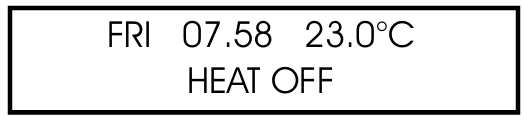
This screen shows the time, actual temperature and the heat relay status (On or Off).
High/Low RUN mode screen
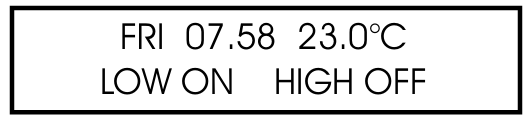
This screen shows the time, actual temperature and the heat status of both high and low flame.
Pressing the Information button followed by option 1 will show the following display:
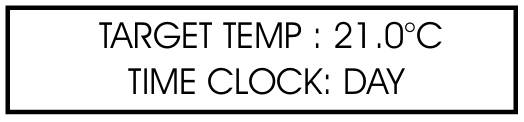
This display is shows the target temperature along with the switching period status.
Override
The Heatmiser IQ+ can be overridden into a day or night condition to allow for any unscheduled operation of the system. The maximum time that the unit can be overridden will have been set by the installer.
To program an override period
From the Normal RUN mode press the Override button and enter your security code if required.
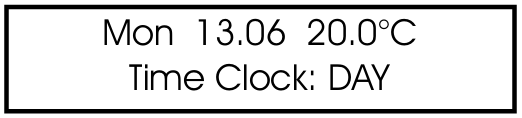
Then choose 1) to enter the override mode
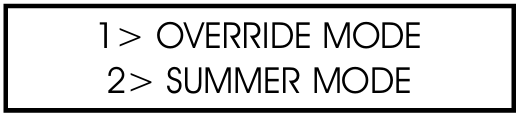
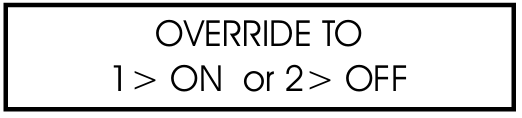
Then select either 1 or 2 to override the zone ON(1) or OFF(2)
You are now prompted to enter the length of the override period.

Should the zone be above temperature, the control will show the following screen. Remember that the override function only overrides time and not temperature. This error message will also appear if the override time programmed exceeds the maximum override setting.

The status screen then indicates the zone has been put into an override condition.

To cancel an override period repeat the steps above, choosing 2 for OFF and then reduce the length of the override period to 00
Summer Mode
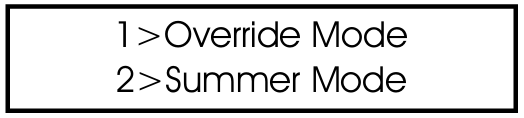
To enable the Summer mode facility press the Override/Summer button and select 2 for summer.
The control is then put in to the summer mode, which means that the temperature is controlled to the Night setback setting.
To cancel repeat the above operation.
Date
To display the current time and date:
- Press INFO
- Press 2 for date
- To cancel, repeat the above operation

Heater Lockout/Reset
A supply can be wired into the Heatmiser from the heater lockout connection allowing for remote indication of a fault. Once the fault has been rectified on the heater, pressing RESET on the keypad sends a reset signal to the heater to clear the lockout status. This feature is highly beneficial on heaters installed out of reach.
Heater Reset (No lockout indication)
On heaters where there is no heater lockout, the Heatmiser can be used to send a reset signal.
To send a Reset signal in the case:
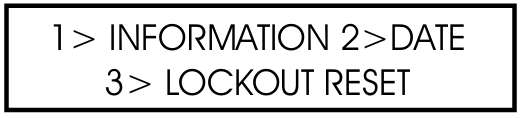
- Press the Info/Reset button
- Press 3 for Reset
The reset relay will be energised for a second.
Manual Summer Fan
Providing the installed heaters are equipped with a summer fan facility, the Heatmiser can enable the fan to give ventilation in summer months.
- Pressing the FAN key displays the following screen.
- At this point you must press ENTER or if you wish to abort this operation pres the DELETE key.
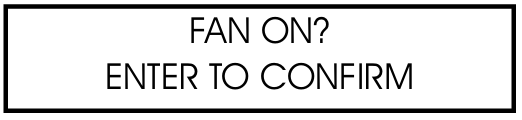
To disable the fan, repeat the above operation.
If the FAN key does not operate, the fan output is being used to give constant or automatic summer fan control. This is described later in this manual.
Program Mode
From the Normal (RUN) mode screen, pressing the PROG button will display the following screen.

Before you can access the Heatmiser you must enter the passcode. This passcode is set to 0000 as a factory default but may be changed at any time by the user to ensure security. This process is explained under section 4 (code).
Temp
This section is used to changed the temperature settings.
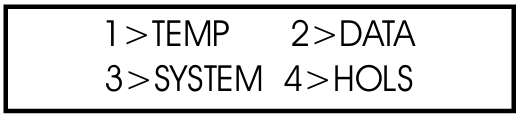
Pressing 1 for Temp displays the following screen:
You are now prompted to enter the required temperature for the DAY periods (EG:22.0). This must be entered as three digits.

When complete, press Enter
You are now able to select whether you require frost protection. Selecting ON enables you to set a NIGHT setback temperature.

Press Enter when you have set the required night temperature.

If S.Fan has been enabled, you are prompted to enter the summer fan temperature. The summer fan temperature is calculated by a differential setting. For example a differential of 03 means that the summer fan temperature will be 03°C above the day setting. Therefore there is no risk of the DAY temperature being higher than the Summer Fan setting.

Data
The DATA section is where you are able to set the daily switching periods. There are 3 switching periods per day available.
- Press PROG and enter the security code
- Now select 2 to enter the DATA menu
You can see on screen now that we are prompted to enter the switching period 1 for Monday. So using 24 hour clock notation, enter the required start time. (EG: 08.00)

Now press enter to accept the Start time and to move the cursor to the end time setting.
We are able to program the required End time, for example 17.00. Don’t forget to use 24 hour clock notation. When complete, press Enter to accept the programmed switching time and to move onto period 2 Monday.
Programming further periods
You are now able to program period 2 Monday in just the same way. Press Enter when complete.
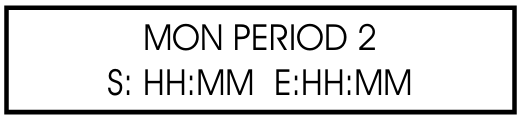
Should you not require all three switching periods, simply leave the times at HH:MM and this period will be ignored.
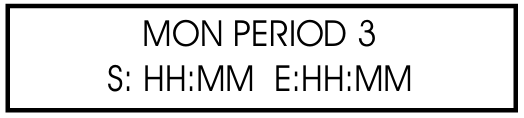
At this point press the Enter key to move onto Tuesday’s switching periods.
You are able to enter the switching periods for Tuesday In just the same way.

Should the switching periods be the same on Tuesday, you can press the COPY button and this copies all of the switching times from the previous day. So, for example, if you were to press the COPY button on Tuesday period 1 all of the switching times from Monday would be copied, and then the Heatmiser would move onto Wednesday.
A screen is displayed to indicate the time have been copied.

To correct any mistakes made, use the DEL Key. If Enter is pressed at any time then the current settings will be retained.
System
This section allows you to set the system time/date and the security codes for the system.
System Time
From the Normal RUN mode press PROG and enter the user security code.

Press PROG and enter the user code
Now press 3 for System
Now press 1 for System time
You are now prompted to enter the new time (Enter this in 24 hour clock notation)

When you have entered the new time, press the Enter key
You are now prompted to enter the System date (Date format is DD:MM:YY)

When you have entered the new date, press the Enter key
You are now prompted to enter the day of week

When you have entered the new day, press Enter. The control will revert back to the menu screen. Press RUN to return to the normal RUN mode.
System Code
Press Prog and enter the security code.
Pressing 3 for System.
Pressing 4 for Code prompts you to select the code you wish to alter.
1> Manager Code - This code gives access to all data settings.
2> Override Code - This code gives access to the Override and Summer functions.
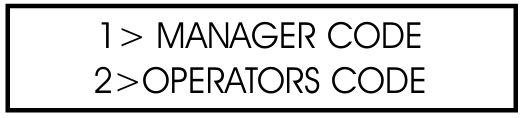
To change the code, simply enter the new code when prompted.

Press RUN to return to the Normal RUN mode.
Setting the Manager and Operators code to the same disables the Operators code. (ie. No code is required to access the operators section)
Logging
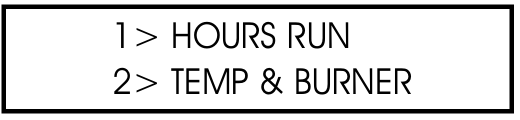
The Heatmiser IQ records hours run and temperature and burner history. Hours run is a weekly total and is stored for the previous 12 months. The temperature and burner history is recorded every 15 minutes and is also stored for 12 months.
Pressing 1 shows you this weeks hours run total. Pressing the left arrow allows you to scroll through the previous weeks. Using the right arrow allows you to scroll back up to the present date.
Pressing 2 shows you the last recorded temperature and burner status. Pressing the left arrow allows you to scroll through the records (15 minute intervals). Using the right arrow allows you to scroll back up to the last record.
Holidays
This is the section used to set the known holiday periods for the year when heating in the zone will not be required.
Five holiday periods can be set. Follow the steps below for instructions on how to set the holiday periods.
Press the program key and select option 4.
You are now prompted to enter the holiday period 1.
You must enter the start date in the DD-MM-YY format. When you have programmed the start date of the holiday press enter.

You should now program the length of the holiday. You should calculate the number of days you want the heating off by counting from the first day of your holiday until the last. Now enter the length.
When the first holiday period is set press the enter key.
Holiday period 2 will now be displayed.
You should program the remaining holiday periods in the same way. When all of the holiday periods have been programmed the control will revert back to the Data menu.
Important Note:
- If enter is pressed at any time then the current setting will be retained.
- To cancel the holiday, put the date to 00.00.00 and length to 00. The holiday will then be cancelled.