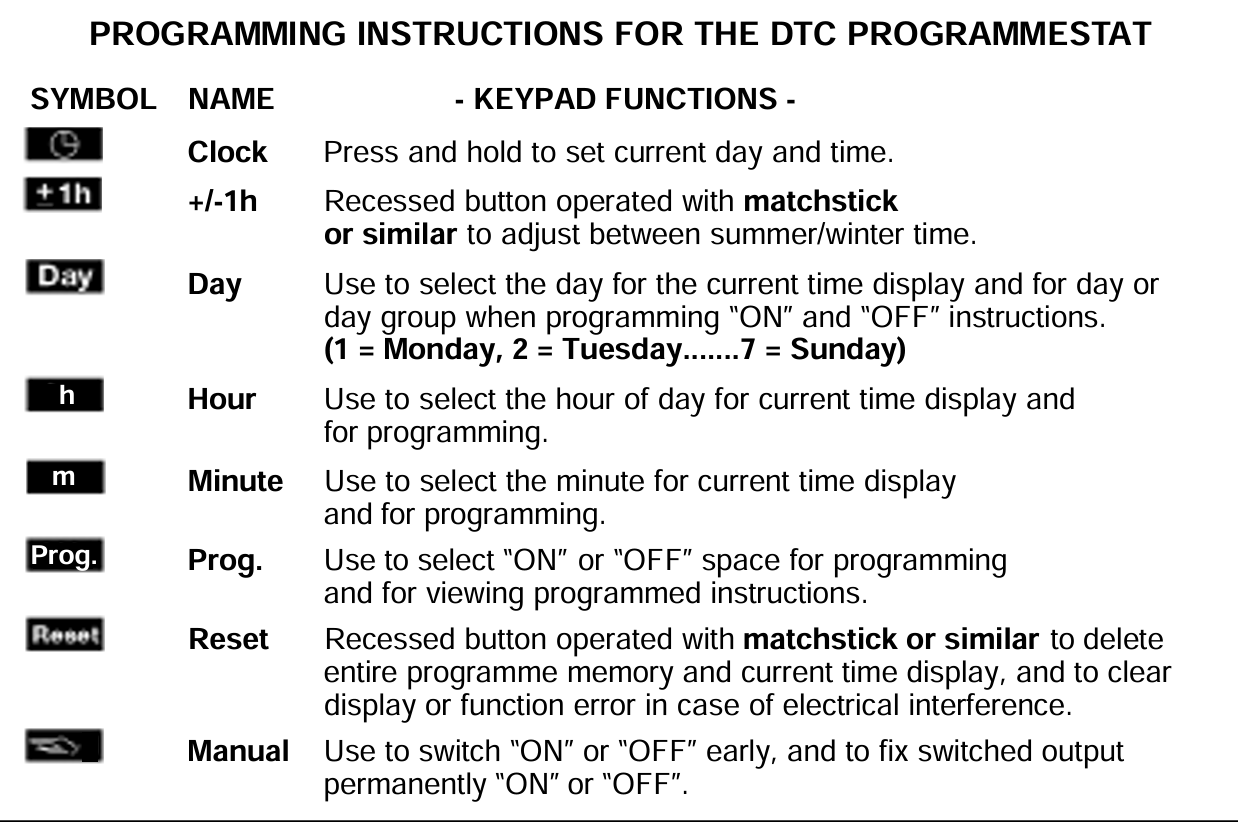
Programming Guide
1. Before Programming
Press Reset to clear any unwanted information. Check operation of +/-1h button.
2. Programme Current Day & Time
Press and hold Clock button until this sequence is complete
Press Day button repeatedly until current day selected.
Press Hour button to select current hour.
Press Minute button to select current minute.
Hold Hour and Minute buttons to fast forward.
3. Setting "ON" and "OFF" times
First ON
Press Day button repeatedly to select day or group of days required for first “ON” instruction. (Available day selections are 1234567/12345/67 or any individual day).
Press Hour button to select hour of day for first “ON” instruction.
Press Minute button to select minute for first “ON” instruction.
Press MANUAL MODE key to select ON
First OFF
Press and release Prog. button. First “OFF” programme is selected.
Press Day button to select day or group of days.
Press Hour button to select hour of day for first “OFF” instruction.
Press Minute button to select minute for first “OFF” instruction.
Press and release Prog. button. 2nd “ON” programme selected
Press MANUAL MODE key to select OFF
Continue to press and release Prog. button to select each subsequent “ON” and “OFF” programme. These are programmed as for the the first “ON” and first “OFF” above. When programming is complete, press the Clock button to revert to the current time display.
Note: After programming is complete and the display now shows the current time the timeswitch will not automatically switch to the correct state for the current time. To select the output required use MANUAL MODE key.
The timeswitch will correctly follow subsequent switching commands according to the programme entered, as they occur in real time.
4. Manual Switch Function
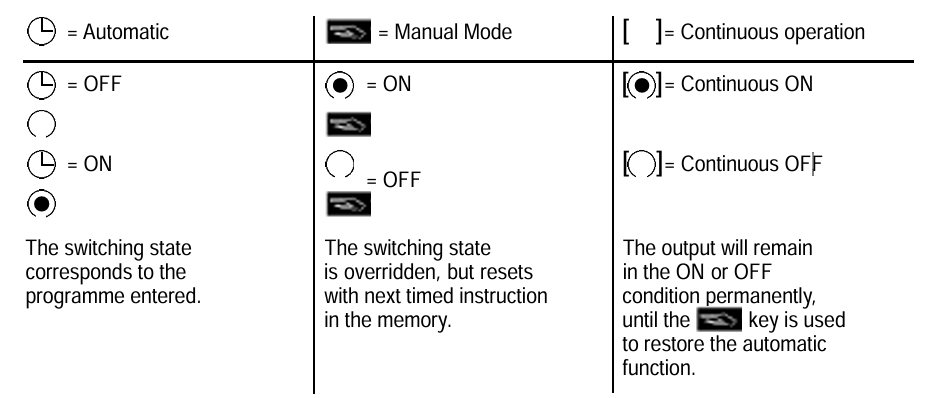
This changes the current switching state without affecting the programmed memory. During timed operation use the MANUAL MODE key to select settings as described in the table below.
5. Auxillary Functions
Read
Press the Prog. key in steps. Each step shows a switching command until the end of the programme.
Then • a free memory location • the number of free memory locations.
Change
Press the Prog. key in steps until you come to the switching command you want to change with the keys Day, h,m.
Delete individual switching commands
Press the Prog. key in steps until you reach the switching command you wish to delete.
Press the h or m key as often as necessary until -:- is displayed.
Press the Prog. key and keep it pressed for approx. 3 seconds. The switching command is deleted.
Summer/Winter time changeover
When clocks change to British Summer time, press +/-1hr once. +1h appears on the display.
When clocks change to Greenwich Mean Time press +/-1h once to deduct an hour.
Please note that the time on the DTC must be set correctly for this function to work correctly.
12h/24h display
If you press the keys “+/-1h” and “h” simultaneously, the display is switched over. AM or PM appears on the display.
6. Setting Temperature
The thermostat is located behind the panel of the DTC programmestat and above the clock. To adjust temperatures switch off the power supply and remove panels (by undoing the two screws) and turn knob to desired temperature as indicated on the thermostat dial.